
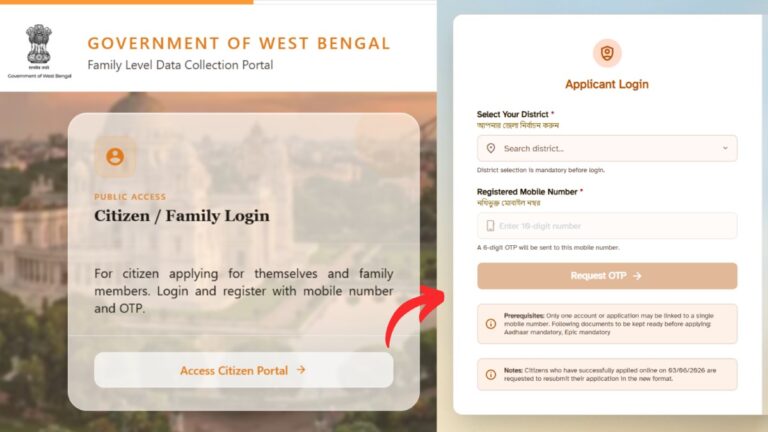
The Annapurna Bhandar Scheme, provided by the Government of West Bengal, allows eligible women citizens to get monthly financial assistance of Rs.3000. You can easily apply for this scheme directly through the official Social Registry portal at socialregistry.wb.gov.in.
– ADVERTISEMENT –
– ADVERTISEMENT END –
In this article, you will get to know the following points about the Annapurna Bhandar scheme,
So, lets see each of these points in detail.
Details required for Annapurna Bhandar online application
Before you can request your Annapurna Bhandar benefits online, you need to make sure,
- you are a permanent resident of West Bengal and a female aged between 25 and 60 years.
- You must have your Aadhaar card and Voter ID with you.
- An active mobile number must also be linked with your Aadhaar card.
- You must have a personal bank account enabled for Direct Benefit Transfer (DBT).
– ADVERTISEMENT –
– ADVERTISEMENT END –
Steps to apply for Annapurna Bhandar Scheme online
To apply for Annapurna Bhandar scheme,
Step 1: Go to the Citizen Portal of the Social Registry website
- First, go to the official Social Registry West Bengal portal website at socialregistry.wb.gov.in.
- Next, click on the ‘Access Citizen Portal’ button.
- The portal will open up in front of you.
Step 2: Login to your citizen account
- Next, select your District from the drop-down menu.
- Next, enter your active mobile number in the box.
- Next, enter the captcha code correctly.
- Next, click on the ‘Request OTP’ button.
- An OTP will be sent to your mobile number.
- Next, enter the OTP.
- Next, click on the ‘Verify & Continue’ button.
– ADVERTISEMENT –
– ADVERTISEMENT END –
Step 3: Fill out your family and personal details
- The “Family Data Collection” form will appear in front of you.
- Next, enter the Name, Date of Birth, and Gender of the Head of the Family.
- Next, select your Category and Religion from the drop-down menu.
- Next, enter your Aadhaar linked mobile number.
- Next, enter your Aadhaar number.
- Next, upload a scanned copy of your original Aadhaar card between 50 KB and 200 KB.
- Next, enter your permanent address details including Pincode, Police Station, and Block.
- Next, enter your Voter Card number.
- Next, upload a scanned copy of your Voter Card.
- Next, enter your Assembly Constituency and Part Number.
- Next, click on the ‘Save Draft’ option.
- Next, click on the ‘Next’ option.
Step 4: Fill out ration card details
- Next, select ‘Yes’ if you have a Digital Ration Card.
- Next, enter your digital ration card type and number.
Step 5: Enter asset and other details
- Next, enter your socio-economic details like land ownership and Swasthya Sathi URN (if available).
- Next, click on the ‘Save Draft’ option.
- Next, click on the ‘Next’ option.
– ADVERTISEMENT –
– ADVERTISEMENT END –
Step 6: Enter income and profession details
- Next, enter your Annual Family Income.
- Next, select your Nature of Employment and Highest Education Qualification.
- Next, click on the ‘Save Draft’ option.
- Next, click on the ‘Next’ option.
Step 7: Select the Annapurna Yojana option
- The scheme selection page will appear in front of you.
- Next, select the ‘Yes, I am applying’ option under the ‘Applying for Annapurna Yojana’ section.
- Next, select ‘Yes’ if you already receive other Government Scheme benefits via DBT.
- Next, select the name of that scheme from the list.
- Next, select the ‘No’ option for the ‘Want to opt out’ question (if you dont want to opt out of that scheme).
- Next, click on the ‘Save Draft’ option.
Step 8: Submit application
- Next, click on the add member option to add the details of other members of your family (if applicable).
- Next, click on the the ‘Declaration and Consent’ section.
- Next, tick the ‘I hereby declare’ consent box.
- Next, click on the ‘Preview and Submit’ button.
You application will be succesfully submitted and an application number will be generated. Note down this number for future reference. You can use it to check your application status later. You can also use the “Download Application” button to download your application.
By following these steps you can easily apply for the Annapurna Bhandar scheme online.